More than 18 years experience                Local pickup available

  Shopping Cart  now in your cart  0 items  
HOME PRICE LIST QUOTATION SUPPORT

SIGN UP

LOG IN TRACK ORDER
DIY COMPUTERS--COMPUTER NOTEBOOK MONITOR PRINTER NETWORK POS SUVILLANCE
Search by manufacturers:
Search by categories:
Search by keyword:
Advanced Search  

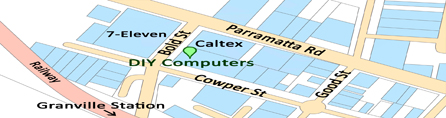
Shop 2, 65-71 Cowper St, 
Granville, N.S.W 2142
Cnr. Bold St
 

Tel: (02)9897 9993
support@diycomputers.com.au

DIY COMPUTERS--Keyboard----Logitech diNovo Media Desktop
BROWSE BY CATEGORIES

  AAA--Special offer--AAA
  Adapter & Converters
  Blank Media
  Cable
  Case / PSU / UPS
  Cash Register & POS
  Computer Package
  Comsumable / INK
  Cooling Device/LED Light
  CPU
  Digital Entertainment
  External Enclosure
  Game Product & Toy
  Graphic Card
  Hard Disk Drive
  Input Device
  IPhone/IPad Accessories
  KVM
  Memory
  Miscellaneous
  Monitor
  Motherboard
  NAS
  Networking
  NoteBook
  Optical Drive
  PDA / GPS / Other Batteries&Charges
  Printer / Scanner
  Router / Modem
  Software
  Speaker / Sound
  Surveillance
  TV Tuner
  USB Accessories/Card Reader
DIY COMPUTERS ->  Keyboard
Logitech diNovo Media Desktop
Hold no illusions: Logitech's new Bluetooth-enabled DiNovo Media Desktop--a suite of high-end input devices--runs a jaw-dropping AU$499. But if you want the all-around finest and most elegant desktop experience, it's the clear choice. If you're simply looking for a good mouse-and-keyboard set, search for less-expensive alternatives.
A$: 299
Stockout
More Details: Best Replica Watches

Detail:
Hold no illusions: Logitech's new Bluetooth-enabled DiNovo Media Desktop--a suite of high-end input devices--runs a jaw-dropping AU$499. But if you want the all-around finest and most elegant desktop experience, it's the clear choice. If you're simply looking for a good mouse-and-keyboard set, search for less-expensive alternatives.

Design
Although comprised of three separate devices--the keyboard, the MX900 mouse, and the so-called MediaPad (basically a remote control on steroids)--the DiNovo Media Desktop is nevertheless a cinch to set up (other Bluetooth-enabled input devices gave us serious installation headaches). We followed the explicit installation poster and had the Media Desktop running in about half an hour, including a full 15 minutes dedicated to the Bluetooth and Media Desktop software installation. One word of caution: Logitech strongly recommends that you remove any previously installed Microsoft Bluetooth components to get the DiNovo's full Bluetooth-hub functionality.

Features
Connecting Bluetooth devices such as mobile phones to the DiNovo's Bluetooth network so that you can, say, use the keyboard to reply directly to a text message is a bit cumbersome and unintuitive, but the process is still better than any we've seen to date. In the dawn of Bluetooth, the DiNovo represents one of the technology's best implementations.

Performance
The DiNovo devices are certainly conversation pieces, thanks to their stylishly thin and sleek design. The keyboard and the MediaPad are relatively shallow, but typing felt excellent in our tests; we even found that we typed a bit faster and more precisely than usual. The keyboard eschews the programmable buttons of Logitech's other boards for a refined look, but it does have Internet and e-mail hot keys, as well as audio-playback controls.

Meanwhile, the innovative MediaPad, which unfortunately can't attach to the keyboard, serves as a numeric keypad, a calculator, and a remote control for audio, video, and photo playback on your PC. (Logitech also provides some rudimentary software for accessing your various media from afar.) Unfortunately the pad doesn't fit comfortably in your hand and navigation is a bit frustrating. Besides showcasing the date and time, the MediaPad's built-in LCD can display track information and text messages from Bluetooth phones and MSN Messenger.

The MX900 mouse is simply a souped-up version of Logitech's award-winning MX700. It feels great in your hand, is extremely precise, and has the five buttons we look for, plus three extras for scrolling and switching windows. The Bluetooth hub also serves as the mouse recharger.


Product specifications and Price are subject to change without notice. PICTURES are for display purposes only. Actual product may differ from that pictured

Information and Picture source from Manufactory official website or direct from supplier,
This document and other documents provided pursuant are for informational purposes only. The information type should not be interpreted to be a commitment on the part of the Supplier. The Supplier cannot guarantee the accuracy of information presented. The user assumes the entire risk as to the accuracy and the use of this document. 


DIY COMPUTERS--COMPUTER NOTEBOOK MONITOR PRINTER NETWORK POS SUVILLANCE
  107 Parramatta Road Granville, N.S.W 2142

Tel: (02)9897 9993

support@diycomputers.com.au  

  Terms & Conditions     Privacy     Customer Care     Payment Details     Store Location     CONTACT US
Monday - Friday 9:30AM to 5:30PM
Saturday 9:30AM to 4:30PM

Copyright © 2006 DIY Computers

Rolex Cellini Replica
Replica Rolex Day-Date II
Rolex Day-Date Replica
Replica Rolex Explorer
Rolex GMT-Master Replica
Fake Rolex Sea-Dweller
Fake Rolex Sky Dweller
Rolex Submariner Replica
Rolex Daytona Replica
Blancpain Replica Franck Muller Replica Omega Replica Patek Philippe Replica Watches Richard Mille Replica Copper Vinyl Wraps Blue Vinyl Wraps Green Vehicle Films Bronze Vinyl Wraps Brown Car Wrap Car Wraps